
Sublimation printing has become one of the pillars of companies that require accuracy, effectiveness, and quality production in their operations. Most businesses begin with rudimentary printing systems and soon find that the conventional uses commonly result in faded colors, jagged prints and expensive reprints. Sublimation printer solve these problems by being able to give consistent, durable and vibrant prints on a vast array of materials, including polyester fabrics, coated ceramics, as well as specialty promotional materials.
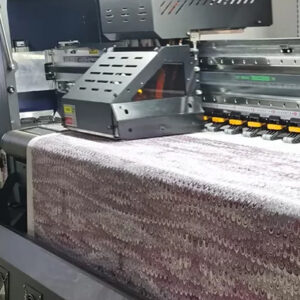 The unique feature of sublimation printing is that it is able to create fine detail designs with high color accuracy, even when it comes to small objects or difficult to make shapes. Such precision is essential to companies that have a dependence on custom made merchandise, customized gifts, or branded merchandise. In the long run, businesses that have perfected the art of sublimating processes do not only have the appearance of their products enhanced but also the functioning efficiency improves. But these results would not be attained by simply having a sublimation printer. It implies the knowledge of the specifics of workflow optimization, the choice of the appropriate materials and inks, and appropriate maintenance. Companies that ignore such factors usually experience downtime, waste of ink, and unpredictable quality of the print which may have an impact on their bottom lines and reputation.
The real advantage of sublimation printing emerges when businesses combine technical knowledge with practical strategies. By learning how to maintain machines properly, troubleshoot issues proactively, and fine tune printing settings, companies can reduce waste, accelerate production, and consistently deliver high quality products. This approach transforms the printing process from a routine task into a reliable, high performing part of the business.
Optimizing Sublimation Printing Workflow
Efficiency in sublimation printing is not just about speed; it is about creating a workflow that minimizes errors, reduces material waste, and ensures consistent quality. Businesses that rely heavily on printing often face challenges such as misaligned designs, uneven color distribution, and extended production times. Addressing these issues requires a combination of planning, the right tools, and disciplined processes. One of the most effective ways to improve workflow is by standardizing production steps. Preparing templates for recurring designs, pre calibrating printers, and organizing materials before printing can significantly reduce downtime. For example, grouping orders by material type or color requirements allows the printer to maintain optimal temperature and pressure settings without frequent adjustments.
Color management also plays a critical role. Sublimation printer respond differently depending on the type of ink, paper, and substrate used. Investing in color profiling tools and regularly calibrating devices ensures that each print matches the intended design. This step is especially important for businesses that produce branded merchandise, where color accuracy can affect brand perception. Batch printing is another key strategy. Printing multiple items in a single session not only saves time but also maintains consistency across products. However, batch printing requires careful monitoring to avoid common problems such as paper misfeeds or ink clogs. Maintaining a clean and organized workspace further supports efficiency by reducing the chances of human error and material damage.
Solving Common Advanced Printing Challenges
Even experienced businesses encounter challenges when working with sublimation printer. While the technology is highly reliable, issues such as color inconsistencies, misaligned prints, or material limitations can affect productivity and product quality. Understanding these challenges and knowing how to address them is essential for maintaining a high performance printing operation. One common problem is color inconsistency. This often occurs when ink, paper, or substrate quality varies between batches. Regular calibration of printers and the use of color profiling software can help achieve uniform results. In addition, storing sublimation inks properly and ensuring they are not expired prevents color shifts during printing.
Misalignment of prints is another issue that can lead to material waste and additional labor. It often arises from incorrect paper placement, inconsistent pressure, or uneven substrate surfaces. Businesses can mitigate this by implementing precise setup procedures, checking alignment before each print run, and using jigs or holders for irregularly shaped items. Attention to detail in these areas ensures every print lands exactly where it should. Material limitations can also pose challenges, especially when attempting to print on unconventional surfaces. Some substrates require pre-treatment or coating to accept sublimation ink effectively. Testing a small sample before starting a full production run helps identify the correct temperature, pressure, and time settings. This proactive approach prevents costly errors and reduces rework.
Heat and pressure errors are another source of printing problems. Too much heat can scorch prints, while too little can result in dull or incomplete designs. Using temperature controlled presses and regularly monitoring the settings during long runs ensures consistent output. By identifying these common challenges and applying practical solutions, businesses can maintain high quality standards, reduce waste, and improve overall efficiency in their sublimation printing operations.

Advanced Sublimation Printing Techniques for Exceptional Results
In case of sublimation printing, good equipment is not enough to ensure consistency in quality. Seasoned specialists are aware that a combination of appropriate technique, environmental conditions, and machine calibration can have a significant impact on the quality of output and productivity of production.
1. Perfecting Color Management
Sublimation printing relies on the accuracy of color. In order to retain vivid and natural to life colors, a well-calibrated display and ICC profiles particular to your printer, ink and paper combination are used. Calibrate your printer on a regular basis, and do test prints to detect color anomalies as soon as they occur. High quality sublimation inks also guarantee deeper tones and high transfer capacity.
2. Controlling Heat and Pressure
The heat press stage is critical for achieving durable and precise transfers. Ensure the temperature and pressure are adjusted according to the material being used. For example, fabrics may require slightly lower pressure than ceramic substrates. Even temperature distribution across the platen is vital for preventing faded patches or ghosting effects.
3. Optimizing Artwork for Sublimation
Not all designs print equally well through sublimation. High-resolution vector graphics or 300 DPI raster images produce the best outcomes. Avoid extremely thin lines or very light gradients, as these can get lost during the heat transfer. Consider the color base of the substrate too; sublimation works best on white or light-colored surfaces to preserve the vibrancy of the design.
4. Managing Environmental Conditions
Humidity and temperature levels in the workspace can directly affect print quality. Too much moisture can cause paper curling or color bleeding. Keep the environment stable by maintaining moderate humidity and storing sublimation paper in a dry place. Small steps like these ensure consistent performance from one batch to the next.
5. Maintenance and Cleaning
A well-maintained printer performs better and lasts longer. Regularly clean printheads to prevent clogging, check for ink buildup, and perform nozzle checks before every large production run. Keeping the printer dust-free and ensuring it operates in a controlled environment minimizes wear and tear.
6. Reducing Waste and Increasing Efficiency
Experienced users optimize print layouts to minimize wasted paper and ink. Batch printing similar jobs together saves time and resources. Reviewing test prints before running bulk jobs prevents costly reprints. Efficiency also comes from understanding the capabilities of your specific sublimation printer and fine-tuning settings for different materials.
7. Leveraging Expertise and Training
Continuous learning helps businesses stay ahead in a competitive market. Training operators to handle troubleshooting, color correction, and software updates ensures smooth workflows. Staying informed about new materials and printing technologies also helps improve output quality and expand service offerings.
Common Sublimation Printing Challenges and Smart Fixes
Even top-quality sublimation printer can face issues that affect print results. Knowing how to solve them quickly helps maintain consistent output and reduce downtime.
1. Faded Colors
Low temperature or pressure often causes dull prints. Check heat press settings and always use high-quality ink and paper for vibrant results.
2. Ghosting
Paper movement during pressing creates ghost images. Secure the transfer paper with heat tape and allow it to cool before removal.
3. Banding
Clogged printheads or wrong settings lead to lines in prints. Run a nozzle check, clean printheads, and use proper print resolution.
4. Moisture Issues
Humidity can curl paper or blur colors. Store paper in a dry place and pre-press to remove moisture before printing.
5. Uneven or Patchy Prints
Uneven heat or pressure causes color variation. Ensure the platen is level and use the correct ICC color profile.
6. Blurred Images
Too much ink or low resolution results in smudges. Design at 300 DPI and let the ink dry before transfer.
7. Substrate Compatibility
Only polyester-coated materials hold dye properly. Always check coating compatibility for lasting color.
Efficiency Hacks and Cost-Saving Tips for Sublimation Printing
Improving efficiency in sublimation printing starts with smart habits and careful planning. Always use accurate color profiles to reduce test prints, maintain stable heat and pressure for consistent results, and clean printheads regularly to avoid downtime. Buying supplies in bulk and storing them properly helps control costs, while using workflow software keeps production organized. Adjust ink settings based on project needs, switch off machines when idle, and recycle materials where possible. These small, steady practices can lower expenses, cut waste, and boost overall printing productivity.
Conclusion
Sublimation printing has excellent color characteristics, permanence and efficiency when handled well. Periodic maintenance, intelligent processes, and proper equipment can go a long way to determine output and cost reduction. At Business Point International, we provide high performance sublimation printer designed for precision, speed, and reliability. Our professional staff also provides after sale support, training and installation services to ensure that your machines are maintained in optimal conditions. In case you intend to upgrade your current system or invest in a new sublimation printer, contact Business Point International today and get a customized solution and personalized service.